
Professional SSD Recovery JLT Expert Solid State Drive Data RetrievalHaving your SSD suddenly fail is a really weird and stressful experience. Unlike those old hard drives that click or make noise to warn you, an SSD usually just dies in total silence. One minute you’re working, and the next, you just see a “disk not found” error or a blank
screen In a busy place like the UAE, where everyone is working fast, this can really feel like a disaster. At Recovery Data, we provide specialized SSD Recovery JLT services We have the right tools to handle how flash storage works. Whether you’re a designer in a JLT tower or a big company in the DMCC area, our lab is here
to help you get your files back when things look hopeless.
SSD Not Detected Our SSD Data Recovery JLT Team Specializes in Flash Failure
When your computer can’t see your SSD anymore, it’s usually not just a small software bug. These drives use special “NAND” chips and controllers that are very sensitive to power changes or just wearing out over time. Our SSD Data Recovery JLT team knows that the “quiet death” of an SSD needs a much smarter plan than just
fixing a regular disk We often meet people who tried to use free recovery apps, but that can actually make the drive start erasing itself forever because of a command called “TRIM.” By coming to a pro lab in Jumeirah Lake Towers, you make sure your drive is handled safely before the data is gone for good.
Why Recovery Data is the Best SSD Recovery JLT Specialist
Fixing an SSD is a very specific job. It takes a lot of money for the right gear and our team has to keep learning because the tech from brands like Samsung or Kingston changes so fast.
Advanced NAND Flash Readers and PC-3000 SSD Tech
To get data from a drive that won’t respond, we use something called the PC-3000. This special tool lets our engineers “talk” directly to the drive’s internal code. We can go around the broken controller to reach the rawfiles hidden on the chips. When you look for professional SSD recovery JLT,
you’re getting the same kind of expert help that top forensic labs use to find data on broken chips.
Safe Lab Environment for Your Private Data
Your files are very important, and we keep them safe. Our lab follows strict rules to make sure your private stuff like company money records or family photos is kept totally secret. Our JLT office has good security and our recovery computers aren’t even connected to the internet. This way, your data stays between you and our lead engineers.
Expert Engineers Who Know How to Bypass Broken Parts
The “brain” of your SSD is the controller. It decides where every piece of data goes. When this part breaks, your data becomes like a giant, messy puzzle. Our engineers are experts at “bypassing” these broken parts to put your files back together. This is why many people say we are the best SSD recovery JLT choice for those hard cases
that normal repair shops just can’t fix.
Comprehensive Solid State Drive Recovery JLT for All Types
SSD tech comes in all sizes now, from the tiny chips inside a new MacBook to the big drives used in office servers.
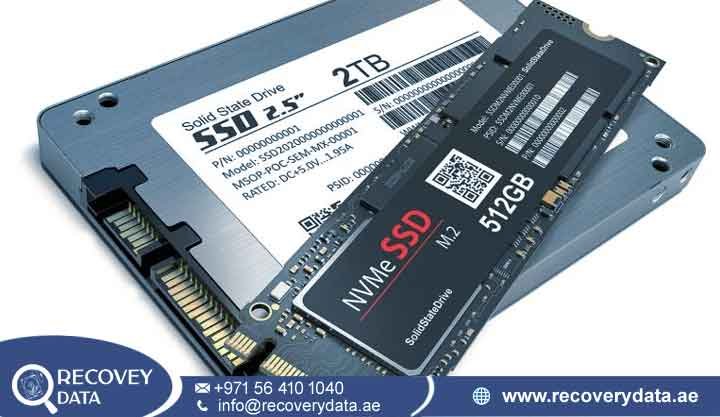
NVMe and M.2 SSD Data Recovery for Modern Laptops
Most new laptops today use M.2 drives because they are super fast. But these drives can get very hot and sometimes just “pop” electronically. We offer special Laptop SSD recovery JLT for all these types. We can reach the data even if your laptop won’t turn on at all or if you spilled some water on it.
Business-Grade SSD Recovery for JLT Servers
Many offices in the JLT district use high-end SSDs for their servers. If these fail, the whole office might have to stop working. Our Server SSD recovery JLT and Business SSD recovery JLT teams treat these as emergencies. We work 24/7 to get your databases back. We understand how Enterprise SSD recovery JLT
works, which helps us get a better success rate for these big business machines.
External Portable SSD and USB-C Drive Fixes
Portable SSDs like the Samsung T7 are very popular for people in JLT. They often break because the USB-C port gets wiggly or someone pulls it out too fast. Our External SSD recovery JLT service fixes both the broken plugs and the internal file errors. We make sure your video projects or photo albums come back exactly how they were.
Integrated MacBook (Soldered) SSD Recovery
Newer MacBooks have the storage chips soldered onto the main board. This makes Internal SSD recovery JLT much harder. We use special “Lifeboat” tools to talk to the chips through a diagnostic port. Even if your MacBook’s logic board is totally dead, we can usually pull the data off without having to take the chips off the board.
Common Issues We Solve for SSD Data Recovery JLT Clients
SSD problems are usually about the electronics or the internal code. We fix these every day:
Controller Failure: The drive has power but doesn’t talk to the computer. This is very common.
Power Surge or Shorts: Usually from a bad charger or a spill. We fix the tiny parts on the board.
Firmware Bugs: The drive’s internal “brain” crashes. It might show up as “0MB” or a weird name.
Chips Wearing Out: Like a battery, these chips get “tired.” We use special tools to read them before they die.
Locked Data: If BitLocker or FileVault is acting up, we help fix the headers so you can get back in.
Deleted by Mistake: If you delete something, turn the drive off fast! We might be able to save it before the “TRIM” command wipes it.
Broken Connectors: We use microscopes to fix broken SATA or M.2 pins.
Our Specialized 6-Step SSD File Recovery JLT Process
We follow a very careful path to make sure we get back as much data as possible.
Detailed Check-up
We start by looking at the drive under a microscope and checking the electronics. This lets us give you a fair price and tell you if we can fix it.
Making a Safe “Virtual Image”
We don’t work on your original drive more than we have to. We make a one-time “copy” of the chips. This is important because once an SSD starts failing, it can die completely very fast.
Rebuilding the Data Map
Once we have the copy, we use software to act like a working controller. We put the “puzzle pieces” of your data back together in the right order.
Reading Chips Directly (If Needed)
If the main chip is really broken, we might have to physically take the memory chips off and read them one by one. This is a very delicate job.
Checking the Files
After we put it back together, we check if the files are healthy. We’ll send you a list so you can see your important stuff is there before you pay.
Secure Handoff
Finally, we give you your data on a new, safe drive. For smaller stuff, we can send a secure link so you can get back to work in JLT right away.
Fast SSD Data Recovery JLT Serving Every Cluster from A to Z
Our lab is right in the middle of JLT, so we are very close to the DMCC area. We know that if your laptop dies, you’re losing work time. We offer a 60-minute pickup service for all JLT Clusters. Whether you need Desktop SSD recovery JLT or help with a laptop, we can start the job within an hour. Staying local is better you don’t
have to worry about your drive getting lost in the mail!
FAQs Understanding SSD Recovery JLT Services
Is it possible to get data from a “dead” SSD?
Yes, most of the time it is! As long as the memory chips aren’t cracked or burnt, we can usually find a way to get the files.
How much does it cost?
It depends on how bad the damage is. Simple software fixes cost less than fixing a broken controller. We’ll give you a fixed quote after we check it for free.
How is SSD recovery different from a normal hard drive?
Normal drives have spinning parts; SSDs are all about complex math and chips. You need special software to understand how an SSD hides data across the chips.
Can you fix an NVMe drive that won’t boot?
Yes, we see this a lot in new laptops. We use a special mode to get the data without needing the drive to “boot up” normally.
Does “TRIM” make it impossible to get files back?
Not always, but it makes it tricky. If you delete something, unplug the drive immediately! The faster you stop the power, the better chance we have.
How long does the check-up take at your JLT lab?
Usually 24 to 48 hours. If it’s a big emergency for your business, we can often do it in just a few hours.
Restore Your Digital Life Contact the Best SSD Recovery JLT Experts Today
Don’t let a broken SSD ruin your week. At Recovery Data, we have the best tech in the UAE and we’re right here in your neighborhood. We know how scary it is to lose data. Whether it’s Internal SSD recovery JLT for your computer or a big server array, we are ready to help.