
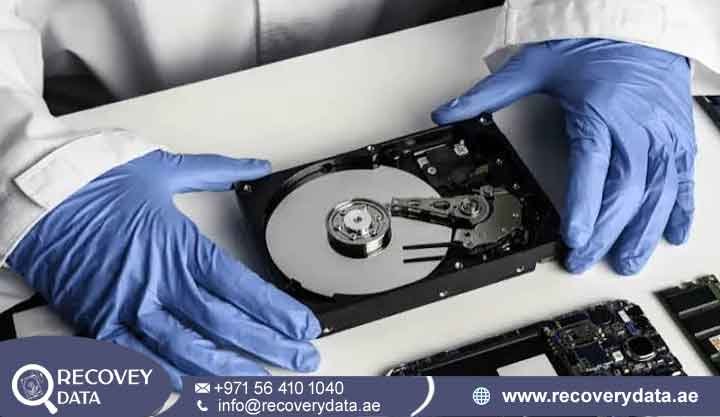
When a hard drive fails to spin, goes completely silent, or emits an alarming clicking sound, the immediate panic usually centers on lost personal memories, irreplaceable media collections, or critical business databases. For users across the UAE, a non-responsive storage device often points to a mechanical problem called spindle motor or hard drive motor failure. A hard drive can appear completely dead even when the magnetic data on its internal platters remains physically intact. This distinction matters because a computer’s inability to access the drive does not always mean that the files have disappeared. In many mechanical failures, the problem affects the components that spin the platters and move the read/write heads.
At Recovery Data, we specialize in diagnosing complex physical hardware failures. Our Dubai facility uses advanced recovery workstations and a certified cleanroom environment. Our engineers handle storage devices that standard software tools and local computer shops cannot safely access. Mechanical hard drive failures need a different approach from logical data loss. damaged bearing, failed motor controller, or physically damaged internal mechanism. If you are dealing with a dead drive, understanding the symptoms, causes, and recovery process can help protect your data. The sooner a failing hard drive receives the correct technical assessment, the better the chance of preventing additional mechanical damage. Repeated startup attempts can place unnecessary stress on damaged internal components.
Professional Recovery for Non-Spinning and Dead Hard Drives
When a hard drive motor stops functioning, the device may appear completely useless. The computer may not recognize it in the BIOS or operating system. You may also feel no vibration from the enclosure.In some cases, the drive produces a faint beep, buzzing noise, clicking sound, or repeated startup attempts. However, the magnetic platters inside the sealed enclosure may still contain the original data. Photographs, videos, documents, databases, project files, emails, and backups can potentially remain intact. The main problem may not involve missing data. Instead, the mechanical system required to access that data may have failed. A hard drive depends on highly precise mechanical movement. The spindle motor must rotate the platters at a stable speed. At the same time, the head assembly must move accurately across the recording surfaces. A seized motor, worn bearing, electrical fault, or unstable spindle can prevent the drive from reaching its normal operating condition. Professional recovery requires specialized engineering skills, compatible donor parts, advanced imaging equipment, and a controlled environment.
Protecting the Original Media
A professional recovery process starts by protecting the original drive. Instead of repeatedly connecting the device to a computer, technicians identify the likely failure and determine the safest recovery method. This approach becomes especially important when the drive contains valuable business information or the only copy of irreplaceable personal files. Continued power cycles can increase the risk of head damage, platter scoring, contamination, or further electrical failure. A controlled recovery process reduces unnecessary stress on the original device. It also gives engineers a better opportunity to preserve the recorded data.
The Danger of DIY Interventions
When a hard drive refuses to spin, many users search for quick DIY solutions. Some methods may appear simple, but they can cause additional damage. Mechanical hard drive recovery requires extreme precision. The platters and read/write heads operate within very small tolerances. A simple action can therefore turn a recoverable problem into a much more difficult recovery case.
The Freezer Trick: Placing a hard drive in a freezer is a common DIY suggestion. The idea claims that cold temperatures can temporarily change internal components and help a failing drive spin. In practice, freezing a hard drive can introduce condensation. Rapid temperature changes can also create additional risks. Moisture may affect electronic components and contribute to corrosion. Once the drive returns to room temperature, condensation can become a serious concern. If the drive contains important data, extreme temperature experiments can make the recovery more complicated. For this reason, freezing a failed hard drive does not provide a safe alternative to professional diagnosis.
Percussive Maintenance: Some users try tapping or hitting a hard drive to “unstick” the motor. This approach can cause serious damage. A hard drive contains delicate heads, precision bearings, spindle components, and magnetic platters. Physical impact can disturb these components or cause the heads to move incorrectly. Even if the motor temporarily starts, the impact may create additional mechanical instability. A drive with an initial spindle problem could then develop head damage or platter surface damage.
Unauthorized Opening: Never open an important hard drive outside a suitable cleanroom environment. Ordinary room air contains dust, fibers, and microscopic particles. These particles can settle on the platter surface after you open the drive. When the drive starts again, the read/write heads may encounter this contamination. That contact can cause head crashes, scratches, and additional platter damage. Opening a non-spinning hard drive at home can therefore transform a mechanical recovery case into a much more complicated media-damage case.
Symptoms of Hard Drive Motor and Spindle Failure
Recognizing mechanical failure symptoms can help you identify when a hard drive needs professional attention. However, similar symptoms can also come from PCB damage, firmware problems, head failures, or power issues. For this reason, sound alone cannot confirm motor failure. A professional diagnosis can identify the actual cause.
No Spin / Total Silence: The drive produces no sound, hum, or vibration when you supply power. This symptom can indicate a motor problem, PCB failure, power delivery issue, or another electrical fault. A normal hard drive usually produces subtle vibration as the platters reach operating speed. If you feel no vibration at all, technicians can test the motor and related electrical systems.
Beeping or Low-Pitched Tones: Some drives produce short and rhythmic beeps during failed startup attempts. The motor controller may send power to the motor while the spindle remains locked. The drive may continue trying to start and then stop. Its internal controller cannot confirm that the platters have reached the required speed. Beeping does not automatically prove motor failure. However, it does indicate that you should avoid repeated power cycles and seek a proper diagnosis.
Repeated Clicking or Grinding: Clicking often points toward a head assembly problem. However, a struggling motor can also cause unusual startup behavior. The drive may repeatedly reset while attempting to initialize. Grinding sounds are especially concerning because they can indicate severe mechanical damage or unwanted internal contact. Continued operation can increase the risk of platter or head damage. Professional assessment becomes more important when these sounds appear.
System Freeze Upon Connection: Connecting the drive through a USB enclosure or SATA port may cause the computer to freeze or become extremely slow. The operating system may wait for the storage device to respond while the damaged drive repeatedly attempts to initialize. In some cases, this behavior can even interfere with the computer’s startup process. If connecting the drive causes repeated freezes, disconnect it. Avoid reconnecting it multiple times.
Common Causes of Hard Drive Spindle Motor Failure
Modern hard disk drives operate with extremely precise mechanical components. Depending on the design, the spindle motor can rotate platters at speeds ranging from 5,400 to 15,000 RPM. Several factors can contribute to spindle instability or motor failure. Understanding these causes can help users handle storage devices more carefully.
1. Physical Shock and Accidental Drops
Dropping an external hard drive can create severe mechanical forces. A sudden impact may bend the spindle shaft, damage bearings, disturb internal alignment, or cause the heads to contact the platter surface. In some cases, the heads can become stuck while the motor continues trying to rotate the platters. In other cases, spindle damage can prevent the platters from reaching the required operating speed. External drives face particular risks because users frequently move them between homes, offices, vehicles, and other locations. A drive may look perfectly normal externally while its internal components have suffered serious damage. If you dropped a drive while it was operating, avoid repeated testing. Each additional startup attempt can potentially worsen the mechanical condition.
2. Bearing Wear and Long-Term Friction
Long-term operation can gradually wear the micro-bearings that support the spindle. Enterprise servers, NAS devices, and heavily used workstations can place drives under continuous workloads. Bearing wear can create vibration, friction, unusual sounds, and unstable rotation. As the condition becomes worse, the motor may struggle to reach operating speed. Long-term friction can also increase heat inside the drive. Continuous operation combined with poor cooling can place additional stress on mechanical components. Eventually, the spindle may seize or become too unstable for normal data access. Professional recovery focuses on stabilizing the mechanical system while minimizing stress on the platters.
3. Electrical Surges and Controller Faults
Power fluctuations, faulty adapters, unstable power supply units, and lightning strikes can damage the hard drive’s Printed Circuit Board (PCB). Electrical surges can damage transient voltage suppression components, motor controllers, and other electronic circuits. If the controller cannot provide the correct electrical signals, the motor may fail to start even when the spindle remains mechanically healthy. This distinction matters because not every non-spinning drive has a mechanical failure. The motor may remain healthy while the PCB cannot control it correctly. A professional diagnostic process checks both the electronic and mechanical sides before technicians decide whether cleanroom intervention is necessary.
4. Manufacturing Defects and Thermal Stress
Manufacturing tolerances can affect mechanical reliability. Prolonged exposure to high temperatures can also accelerate component wear. Hard drives installed in poorly ventilated computers, overloaded servers, or enclosed storage systems may operate at elevated temperatures for extended periods Temperature alone does not guarantee motor failure. However, long-term thermal stress can contribute to mechanical degradation and reduce component life. Repeated temperature changes can also cause internal components to expand and contract. Over time, this movement can contribute to mechanical instability. Proper ventilation, stable temperatures, and reliable power delivery can help maintain hard drive health.
Our Cleanroom Motor Failure Recovery Process in Dubai
Recovering data from a seized or failed hard drive motor requires a careful engineering process. Our recovery process uses a controlled Class 100 cleanroom environment when technicians need to access the internal drive chamber.
Initial Intake and Diagnostics
The process begins with detailed diagnostics. Our engineers assess the drive’s condition and identify the likely failure. Technicians record the drive’s identification details and examine its symptoms. They also determine whether the problem involves the PCB, spindle assembly, head assembly, firmware, or another component. This assessment prevents unnecessary intervention. It also allows the team to create a recovery strategy based on the actual condition of the drive.
Class 100 Cleanroom Intervention
When the drive requires internal mechanical work, technicians move it into our Class 100 cleanroom. A controlled environment helps reduce contamination risks. Ordinary room air contains dust, fibers, and microscopic particles that can settle on platter surfaces. Technicians work carefully around the platters, spindle assembly, and head mechanisms. They avoid unnecessary contact with the magnetic surfaces. The exact recovery method depends on the drive model, failure type, donor availability, and condition of the internal components.
Mechanical Overhaul or Motor Replacement
If the motor has suffered mechanical damage, engineers may perform a mechanical overhaul or use compatible donor components. The correct procedure depends on the drive’s construction and failure condition. Technicians determine whether they can restore the spindle or whether they need to transfer the platter assembly into a compatible donor chassis. The objective is not simply to make the drive work again. The primary objective is to create a stable platform that allows engineers to read the stored data safely.
Sector-by-Sector Cloning and Imaging
After technicians restore stable operation, they use specialized hardware imagers to create a sector-by-sector copy. This approach reduces unnecessary stress on the original drive. Engineers can work from the recovered image whenever possible. Specialized imaging equipment can also handle difficult sectors more carefully. The system can manage unstable areas without relying on normal operating-system commands.
Data Verification
After imaging and file reconstruction, engineers verify the recovered data. They check requested folders, documents, photographs, databases, videos, and other important files. This verification helps confirm the usability of the recovered information. The recovery process therefore goes beyond mechanical repair. The ultimate goal remains safe and complete data extraction.
Step-by-Step Hard Drive Motor Recovery
Step 1: Comprehensive Diagnostics and Evaluation
Every failed drive arriving at our Dubai laboratory undergoes a non-destructive diagnostic evaluation. Engineers test the PCB, pre-amp circuits, motor windings, power components, and other relevant systems. They use specialized hardware tools to determine whether the failure involves electronics, firmware, or mechanical components. Engineers also evaluate the drive during controlled startup attempts. They avoid continuous power cycling through a standard computer. Different failures require different recovery strategies. Replacing a motor will not solve a damaged PCB. Likewise, repairing a PCB will not fix a seized spindle. By identifying the failure category first, technicians can select the least invasive recovery route.
Step 2: Cleanroom Intervention
When diagnostics confirm a seized spindle or internal motor failure, technicians move the drive into our certified Class 100 cleanroom. Air filtration systems help remove airborne particles. This controlled environment reduces contamination risks when technicians access the drive chamber. Engineers work carefully around the platters, spindle assembly, heads, and internal alignment structures. They use specialized tools designed for precision storage-media work. The exact procedure depends on the drive model and the physical condition observed during inspection.
Step 3: Spindle Repair or Platter Transplant
Depending on the failure, engineers may use one of two advanced procedures.
Spindle Assembly Overhaul involves addressing damaged mechanical components and using compatible donor parts where appropriate. The goal is to restore stable platter rotation while preserving the original magnetic media.
Platter Relocation (Platter Swap) involves moving the magnetic platters into a compatible donor chassis with a healthy motor and suitable head assembly. This procedure requires extreme precision. The original platters contain the customer’s recorded information, so technicians must maintain their position and alignment throughout the process. Engineers choose the appropriate method after evaluating the spindle, heads, platters, and overall drive condition.
Step 4: Sector-by-Sector Imaging
After the motor reaches a stable operating condition, technicians connect the drive to specialized imaging equipment. The system creates a 1:1 bitstream clone onto secure destination media. Engineers can bypass difficult sectors and manage unstable read errors during the imaging process. This approach protects the original drive from unnecessary access attempts. It also gives engineers a working image from which they can reconstruct the customer’s files.
Supported Storage Brands & Formats
At Recovery Data, our engineering capabilities cover major storage manufacturers and common storage form factors. Different manufacturers use different firmware systems, mechanical designs, spindle configurations, and internal components. Professional recovery therefore requires broad experience with multiple storage technologies.
Desktop & Laptop Hard Drives: Seagate Barracuda, Western Digital (WD Blue, Black, Red), Toshiba, and Hitachi (HGST) 3.5-inch and 2.5-inch drives can experience mechanical failures. These drives appear in desktops, laptops, workstations, backup systems, and other storage environments. Their internal configurations vary, so technicians must assess donor compatibility for each case.
External Portable Hard Drives: WD My Passport, Seagate Expansion, Toshiba Canvio, and LaCie rugged drives can also develop spindle and motor failures. External drives face additional risks from accidental drops, impacts, cable problems, power issues, and frequent transportation. Even when the enclosure looks normal, the internal HDD may have suffered serious mechanical damage.
Enterprise & Server Storage: High-RPM SAS and SATA drives used in rack servers and Network Attached Storage (NAS) systems can also experience mechanical failure. Enterprise drives often operate under continuous workloads. Professional recovery becomes particularly important when a failed disk contains business-critical information. Recovery may also involve RAID configurations and multiple disks. Engineers must consider how each failed drive relates to the overall storage system.
Data Recovery Services Tailored for the UAE
Operating from Dubai, Recovery Data provides professional and confidential data recovery services for customers across the UAE. Our services support individuals, small businesses, government entities, and multinational corporations across Dubai, Abu Dhabi, Sharjah, Ajman, Umm Al Quwain, Ras Al Khaimah, and Fujairah. Customers may need help recovering photographs, business documents, financial records, databases, project files, surveillance footage, server information, or other critical digital assets. Recovery requirements vary between customers. A home user may need to recover family photographs from one external hard drive. A business may need to restore operational databases from a failed server drive. In both cases, the core principle remains the same. Protect the original storage device and identify the safest technical recovery method.
Secure Handling and Data Confidentiality
Storage devices can contain sensitive personal documents, corporate information, financial records, legal files, photographs, and customer data. Our laboratory follows controlled data-handling procedures, secure chain-of-custody practices, and restricted access protocols. Authorized personnel handle customer devices and recovered information. Confidentiality matters especially during business and enterprise recovery cases. A failed hard drive can contain commercially sensitive information even when the physical device appears worthless. Secure handling therefore remains an important part of the recovery process. We maintain controlled access from intake through technical examination, imaging, verification, and final delivery.
Transparent Communication and Evaluations
We believe in transparent communication throughout the recovery process. After the initial evaluation, we provide information about recovery feasibility, expected timelines, and pricing before major technical work begins. Recovery results depend on several factors. These include platter condition, head condition, spindle damage, firmware status, electronics, and other internal components. For this reason, a technical assessment provides more value than promising a fixed result before examining the device. Our customer support team also provides updates during important recovery stages. Customers can understand the current status and any additional technical requirements. This communication helps customers make informed decisions throughout the recovery process.
Frequently Asked Questions
Can data be recovered from a hard drive with motor failure?
Yes, recovery can remain highly feasible when the magnetic platters remain in good condition. Motor failure mainly affects the drive’s ability to rotate the platters. The original information may still exist on the magnetic surfaces. Professional cleanroom intervention can restore a suitable mechanical platform or use a compatible donor configuration. Engineers can then begin controlled imaging. However, recovery depends on the overall condition of the drive. Head crashes, platter scratches, contamination, electrical damage, and secondary failures can make the process more difficult. A professional diagnostic evaluation can determine the actual condition before technicians select a recovery strategy.
How can I tell if my hard drive motor has failed or if it is just the PCB?
A completely silent drive with no vibration may have a failed PCB, power issue, seized spindle, or another electrical problem. External symptoms cannot reliably distinguish these failures. Professional diagnostics can test motor windings, PCB components, power circuits, and startup behavior. This distinction matters because each failure requires a different procedure. A PCB-related problem may not require opening the drive chamber. A seized spindle may require cleanroom intervention. Proper diagnosis helps technicians avoid unnecessary mechanical handling.
Is it safe to open a non-spinning hard drive at home?
No. Avoid opening an important hard drive outside a certified cleanroom environment. Normal room air contains dust and microscopic particles. These particles can contaminate the platter surface after you open the drive. When the drive starts, the read/write heads may encounter the contamination. This can cause scratches, head damage, and further degradation. Hard drives may look simple externally, but their internal components operate with extremely precise tolerances. If the drive has stopped spinning and contains important information, professional assessment provides a safer approach.
How much does data recovery cost in Dubai?
Data recovery costs depend on the failure type, storage media, internal condition, and required technical procedures. A simple electronic failure can require a very different process from a seized spindle. A complex case may require cleanroom intervention, compatible donor components, mechanical work, and advanced imaging. For this reason, a final price requires device evaluation. We provide an assessment and upfront quote before major recovery work begins. The evaluation considers the failure type, required equipment, donor requirements, recovery complexity, and media condition.
How long does a hard drive motor recovery take?
Standard evaluations typically take 24 to 48 hours. The complete recovery timeline can vary based on the drive’s condition and mechanical complexity. A drive with a simple electronic issue may progress faster than a drive requiring cleanroom work, donor components, spindle intervention, platter relocation, and extensive imaging. Emergency data recovery services can support urgent business-critical cases. Where possible, engineers prioritize these devices for accelerated attention. However, speed should never compromise data safety. Mechanical failures require careful handling to prevent additional damage.
Professional Assistance
If your hard drive has stopped spinning, produces unusual clicking sounds, makes beeping or grinding noises, or no longer appears on your computer, stop unnecessary power cycles. Do not repeatedly connect the drive to different computers. Do not open the drive casing. Avoid freezing the device, hitting it, or attempting unverified mechanical repairs. Every additional attempt can increase the severity of an existing mechanical failure. A non-spinning hard drive does not automatically mean permanent data loss. The magnetic data may still remain on the platters even when the motor, spindle, PCB, or other components have failed. The safest next step is to stop unnecessary handling and arrange a professional assessment. Early intervention helps engineers determine whether the problem involves electrical components, mechanical parts, firmware, or multiple failures.
Contact Recovery Data for a professional data recovery assessment.
Email: info@recoverydata.ae
Phone: +971 56 410 1040