
Hard Drive Recovery Al Nahda dubai
Data loss strikes without warning. It can turn an ordinary working day into an emergency for residents and businesses in Al Nahda, Dubai. The area sits along the busy Sharjah-Dubai border corridor. Thousands of households, professionals, retailers, and companies depend on digital storage every day. When an internal laptop drive fails, an external backup disk […]
Data loss strikes without warning. It can turn an ordinary working day into an emergency for residents and businesses in Al Nahda, Dubai. The area sits along the busy Sharjah-Dubai border corridor. Thousands of households, professionals, retailers, and companies depend on digital storage every day. When an internal laptop drive fails, an external backup disk stops spinning, or a storage system drops offline, important data can disappear from view.
Affected users may lose family photographs, financial records, tax documents, client databases, and project archives. Some devices also contain years of business information with no recent backup. A failed hard drive can interrupt normal operations and delay important projects. It can also prevent employees from accessing customer records and essential documents. Personal users face similar problems. A damaged drive may contain photographs, videos, educational files, and personal documents. Many of these files cannot simply be recreated. This makes professional data recovery an important option when standard access fails.
At Recovery Data, we specialize in advanced services. We help individual users and enterprise clients across the Emirates retrieve lost files safely. Data loss cases rarely follow the same pattern. Some cases involve simple deletion or formatting. Others involve severe mechanical failure, firmware damage, or physical destruction. Consumer recovery software cannot handle every type of failure. Unverified repair tools can also create additional risks. Our laboratory combines technical engineering, specialized sector-reading methods, and cleanroom procedures. We use these techniques to work with severely damaged storage media.
Diagnostic-First Recovery
Every recovery case starts with a careful assessment. Our engineers first identify the device type and failure symptoms. They also consider the condition of the storage media. Previous repair attempts can affect the recovery strategy as well. This diagnostic-first method helps our specialists avoid unnecessary procedures. It also allows them to select a recovery method that matches the actual condition of the device. Whether your workstation hard drive clicks or your external HDD asks for formatting, we can assess the problem. We also handle enterprise storage arrays affected by firmware corruption. Our technical team uses a structured approach to protect the original media during recovery.
Types of Hard Drives We Recover in Al Nahda
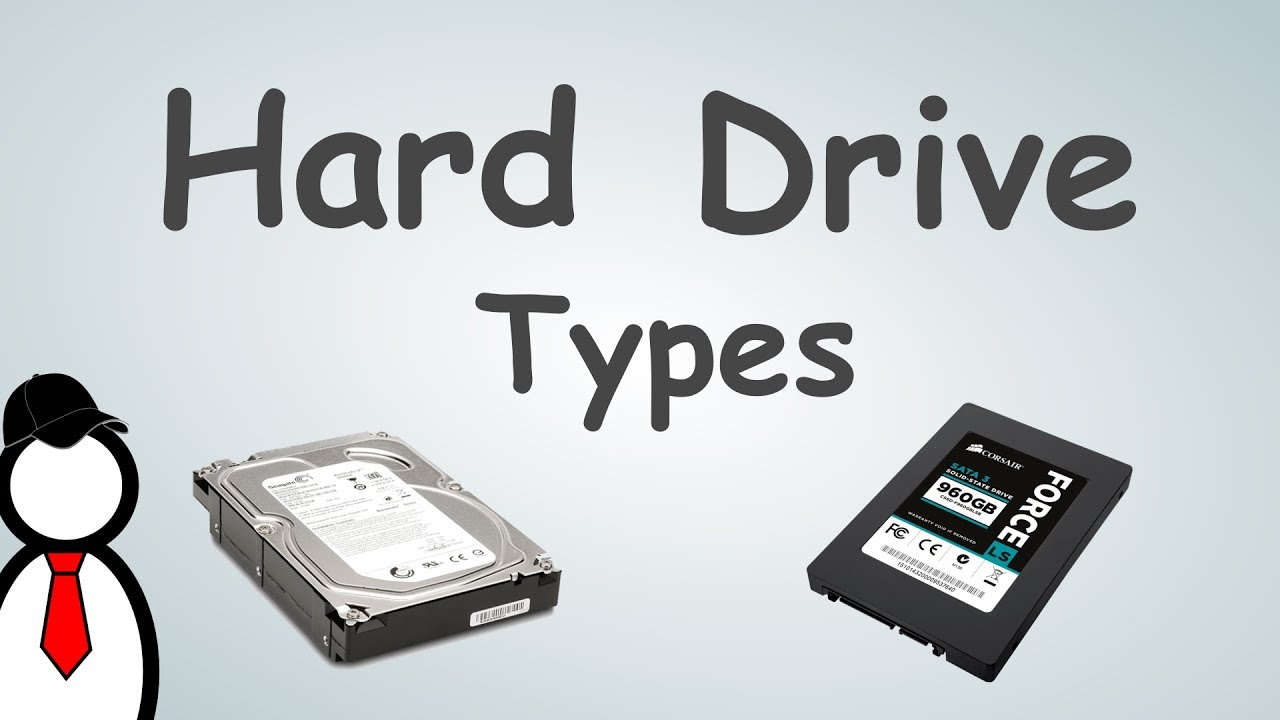
Storage technology varies across modern computing environments. Each device architecture requires a suitable technical approach. Our facility handles storage media used by home users, professionals, and businesses throughout Dubai. Different storage technologies can fail in different ways. A conventional HDD with damaged heads needs a different recovery process from an SSD with a failed controller. RAID and NAS systems require another level of technical analysis.
Matching the Recovery Method to the Device
Our engineers first identify the storage technology. They then review the symptoms and available device information. This helps them select the safest recovery method. The process may involve logical recovery, controlled imaging, firmware analysis, or component-level work. Physical recovery may also require specialist cleanroom procedures.
Internal HDD and SSD Recovery
Internal storage drives power desktop workstations, gaming systems, and corporate laptops. These drives store operating systems, applications, business files, and personal information. A failure can therefore prevent the entire computer from working normally. Common symptoms include boot failures, blue screens, clicking sounds, and BIOS detection problems. Some failures involve corrupted system files. Others point to mechanical or electronic damage. Repeated restarts can place extra stress on a failing drive. This risk becomes greater when the drive produces unusual sounds. Professional assessment helps identify the real source of the problem.
Traditional Hard Disk Drives (HDDs): Traditional HDDs use spinning magnetic platters and moving read/write heads. These components can suffer mechanical wear over time. Motor problems, head crashes, bad sectors, and PCB failures can also prevent normal access. Some drives show incorrect capacity after failure. Others disappear from the operating system or fail to display their partitions. Clicking, grinding, buzzing, and repeated spin-up sounds can indicate serious problems. Users should avoid unnecessary power cycles when these symptoms appear. Repeated operation can make a physically damaged drive harder to image. Our engineers first assess the drive before selecting controlled imaging or another recovery procedure.
Solid State Drives (SSDs) & NVMe M.2 Drives: SSDs use flash memory cells and complex controller technology. This design creates different recovery challenges. SSDs often fail without the warning sounds associated with mechanical HDDs. Controller failure, voltage problems, firmware corruption, and NAND issues can make an SSD inaccessible. Wear-leveling and TRIM can also affect the recovery process. These technologies change how the device stores and manages information. Specialized hardware may help engineers access raw NAND memory. The process requires knowledge of controller behavior and flash storage architecture. An SSD that no longer appears on a computer should not undergo repeated formatting or initialization.
Random repair utilities can alter the remaining information. A professional diagnostic assessment provides a safer way to identify the controller, firmware, NAND, or file-system problem.
External Hard Drive Recovery (Seagate, WD, Toshiba)
Portable external hard drives often travel between homes, offices, and other locations. This makes them vulnerable to drops, impacts, cable problems, and power issues. They also face risks when users disconnect them during active file transfers. We routinely service major external manufacturers. These include Seagate, Western Digital, Toshiba, and LaCie. External drives commonly store backups, business archives, media libraries, CCTV recordings, and personal photographs.
External Enclosure and Connection Problems
A failed external drive does not always have an internal storage failure. The enclosure can also cause problems. USB bridge chips, power circuits, and connection ports can fail. A damaged micro-USB port may prevent communication with the computer. A faulty USB bridge can create similar symptoms. Power problems can also stop the internal drive from starting. Our engineers assess the enclosure and internal storage separately. They determine whether the problem affects the USB interface, internal drive, or PCB. This helps avoid unnecessary replacement of functional components. If the internal drive has physical damage, we use a different recovery strategy. Controlled imaging or specialist hardware intervention may become necessary. This structured assessment helps protect the original data.
Enterprise Storage & Advanced Arrays
Businesses in Al Nahda often depend on multi-drive storage systems. Law firms, engineering offices, retailers, and other organizations may use NAS and RAID systems. These systems can store databases, project files, accounting records, employee information, and customer data. A failure involving several drives can affect the complete logical structure. Engineers must understand the original RAID level and drive order. They may also need to analyze stripe configuration, file systems, controllers, and metadata.
NAS and RAID Recovery
A NAS unit may fail after a firmware update. A RAID controller can also crash or lose communication with multiple drives. In these cases, standard recovery software may not provide a suitable solution. Our engineers analyze individual drives before attempting array reconstruction. They can reconstruct virtual file systems and review RAID parameters. They also work with firmware-level corruption when required. The team creates controlled drive images whenever possible. They then work toward reconstructing the logical storage environment. This approach reduces unnecessary changes to the original drives. Incorrect RAID rebuilding can overwrite important metadata. Repeated initialization attempts can create additional problems. Professional handling therefore becomes important when a business storage array fails.
Common Hard Drive Failure Scenarios We Handle
Understanding the cause of data loss helps determine the recovery strategy. Storage failures generally involve physical damage, logical corruption, or a combination of both. A drive may first develop bad sectors. Continued use can then cause file-system corruption. A power event may damage the PCB and affect firmware information at the same time.
Mechanical & Physical Damage
Physical damage affects the internal hardware of a storage device. The symptoms can vary based on the failed component.
Common indicators include:
Clicking, Grinding, or Beeping Sounds: These sounds can indicate problems with the read/write heads. The heads may struggle to track the magnetic platters correctly. Repeated operation can increase the risk of platter damage. Grinding sounds require particular caution because they may indicate internal mechanical contact.
Spindle Motor Seizure: The spindle motor spins the platters at high speed. A failed or seized motor can prevent the drive from starting. The read/write heads cannot access the platters when the motor cannot operate normally. Specialist equipment may become necessary to stabilize the drive.
PCB Burn-out: Power surges and incorrect adapters can damage the printed circuit board. Electrical shorts can cause similar problems. A damaged PCB can make a healthy internal drive appear completely dead. Engineers inspect the board and test its components before deciding on a repair strategy.
Cleanroom Recovery for Physical Failures
Physical mechanical recovery requires a certified ISO-compliant cleanroom environment. Hard drive platters require controlled handling. Dust particles can contaminate exposed internal components. The clearance between the head and platter is extremely small. Contamination can therefore create additional risks. Our cleanroom infrastructure provides a controlled workspace for delicate drive repairs. Technicians can inspect internal components under controlled conditions. They can also perform specialist procedures when required. These procedures may include head replacement or other mechanical interventions.
Logical & File System Corruption
Logical data loss can occur when the hardware remains functional. The problem may instead affect partitions, file systems, or data structures.
Common scenarios include:
Accidental Formatting & Partition Deletion: A quick format can remove important file-system references. Deleting a partition can also make directories disappear from the operating system. Some underlying data may still exist on the storage media. The recovery outcome depends on several factors. These include the type of format, subsequent data writing, and file-system condition. Continued use can overwrite recoverable information.
File System Damage (NTFS, exFAT, FAT32, APFS, HFS+, EXT4): File-system corruption can prevent an operating system from mounting a volume. A drive may appear as RAW, unallocated, inaccessible, or incorrectly formatted. Damaged MFT structures can affect NTFS volumes. Other file systems use different metadata structures. Engineers examine these structures to determine whether they can reconstruct the original file system.
Malware & Ransomware Encrypted Structures: Malware can damage file headers and directory structures. Ransomware can also encrypt files and affect shared storage environments. These cases require careful handling to avoid unnecessary changes.
Logical Recovery Techniques
Logical recovery can involve file-system reconstruction and raw file carving. Engineers may also analyze metadata and individual sectors. Controlled cloning can provide a safer working copy. The team can then examine the cloned image instead of repeatedly accessing the original device. This approach helps protect the source media.
Our Secure Data Recovery Process
At Recovery Data, we maintain a strict, transparent, and methodical recovery pipeline. The process protects sensitive media from further degradation. Every case follows a structured workflow. Our engineers first identify the failure. They then select the recovery method that best matches the device condition.
Diagnostic Evaluation
The process begins with a Diagnostic Evaluation. Our recovery specialists examine the storage device carefully. They identify the cause and extent of the failure. The team checks whether the problem involves physical damage or logical corruption. They also assess firmware behavior, bad sectors, and file-system condition.
Cleanroom Repair and Imaging
The next stage involves Cleanroom Repair and Imaging when physical damage requires specialist intervention. Our technicians use controlled cleanroom conditions and professional recovery equipment. They stabilize the media before creating a secure image. Controlled imaging helps protect the original device. It also allows further recovery work to continue from a working copy whenever possible.
Data Extraction and Verification
The final stage involves Data Extraction and Recovery. Specialists extract recoverable files, folders, databases, photographs, videos, and documents. The team then checks the recovered information for integrity. Clients can review the recovery results before the final data transfer.
Step 1: Free Diagnostic Evaluation
When you bring or send your failed storage device to our Dubai laboratory, our engineers conduct a detailed assessment. They examine both the hardware and logical condition of the device. The team looks for bad sectors, damaged heads, firmware problems, and file-system corruption. They also review the symptoms reported by the client. After the assessment, we provide a transparent quotation. Clients can then understand the available recovery options before making a financial commitment.
Identifying the Correct Recovery Method
The diagnostic stage helps determine whether the drive can support controlled imaging. It also shows whether specialist intervention is necessary. Businesses can use this information to plan downtime and recovery priorities. Personal users can also understand why the drive stopped working. Our team focuses on an honest technical assessment. We do not rely on generic procedures for every storage device.
Step 2: Cleanroom Repair & Imaging
If physical intervention is necessary, our technicians perform component-level repairs inside our cleanroom facility. Procedures can include head stack replacement or spindle-related work. Once the drive becomes stable, we create a sector-by-sector bit-stream clone. Specialized hardware imagers help engineers manage this process. We never perform recovery operations directly on the original client media. This approach helps preserve fragile sectors and reduces unnecessary wear.
Controlled Sector Imaging
A sector-by-sector image provides a working representation of accessible storage. It does not depend only on the operating system’s normal file view. This method helps when partitions or file systems have become damaged. It also helps when individual sectors show reading problems. Once imaging finishes, specialists can perform logical reconstruction from the working copy. The original device remains protected during the remaining recovery stages.
Step 3: Secure Data Extraction & Verification
Using the cloned bit-stream image, our software systems reconstruct directory trees. They can also recover custom folder structures where the available metadata allows it. The team checks major document, database, and media formats. Clients can review a detailed recovery report before data transfer.
File Integrity and Final Delivery
Verification helps confirm that recovered files contain usable information. Engineers also check whether folder structures remain intact. Business clients can identify important databases and project files. Personal users can review photographs, videos, and documents. The recovered information then moves to a healthy return medium. This gives clients a safer location for their recovered data.
Why Choose Recovery Data for Al Nahda Residents & Businesses?
Entrusting family memories or confidential business assets to a recovery laboratory requires confidence. Technical competence, data security, and business integrity all matter. Professional recovery involves more than running file recovery software. It requires controlled handling, suitable equipment, technical expertise, and careful communication.
Local Accessibility & Convenient Logistics
Conveniently serving Al Nahda 1 and Al Nahda 2, we coordinate secure device pickup and drop-off logistics. Our service covers Dubai, Sharjah, and the wider UAE. Clients can arrange collection when they cannot transport the device themselves. Businesses can also discuss logistics for multiple storage devices or urgent recovery cases.
No Data, No Fee Policy
Our business model focuses on transparency. If your critical files cannot be recovered, you owe nothing for the recovery effort. We first assess the storage media. Our engineers then determine the technically available recovery options. Clients can make an informed decision after receiving the diagnostic findings. This approach avoids unnecessary commitments before technical assessment.
Strict Confidentiality Protocols
Formatted drives, servers, and laptops can contain sensitive information. Business devices may contain financial records, customer data, legal documents, and employee information. We follow strict confidentiality procedures during handling, storage, and return. These procedures help limit unnecessary access to client information.
Decades of Engineering Expertise
Our technical team has extensive experience with data architecture, firmware forensics, and file-system recovery. This expertise helps us handle cases beyond the scope of standard consumer software. Complex cases can involve hardware, firmware, controllers, partitions, and file systems. Our engineers examine these elements together when developing the recovery strategy.
Frequently Asked Questions (FAQ)
How can I safely send my hard drive from Al Nahda to your Dubai lab?
Clients in Al Nahda can arrange secure courier collection from their location. They can also drop off their storage devices at our Dubai facility. Wrap the failed drive in anti-static material and bubble wrap. This helps protect it from physical shock during transportation. Avoid placing a damaged drive loosely inside a bag. Movement and impact can worsen existing mechanical problems. Tell our team if the drive suffered an impact, water exposure, fire damage, or electrical failure. This information helps us handle the device correctly from the start.
What should I do immediately if my hard drive stops working?
Power down the computer or disconnect the external storage device. Do not run chkdsk commands, repair utilities, or random recovery software. Repeated operation can increase the risk of further damage. This risk becomes greater when the drive makes clicking, grinding, or beeping sounds. Keep the device safely stored after disconnecting it. Then arrange a professional diagnostic assessment.
How much does hard drive data recovery cost in Dubai?
Recovery costs depend on the type and complexity of the failure. A simple logical recovery may require a different process from a mechanical failure. The cost can also depend on storage capacity and physical damage. Firmware problems and complex cleanroom repairs can require additional technical work. We perform a diagnostic evaluation before providing a clear quotation. This allows the price to reflect the actual condition of the device.
How long does a hard drive data recovery process take?
Standard diagnostic evaluations are typically completed within 24 hours. The actual recovery time depends on the device condition and recovery complexity. Logical recoveries can take a few days. Physical failures may require more time for controlled imaging and cleanroom procedures. Large drives can also require additional imaging time. RAID and NAS cases may require further reconstruction work. Emergency rush services are available for urgent enterprise cases. Our team can provide a more realistic timeline after completing the diagnostic assessment.
Professional Assistance for Your Formatted or Damaged Drive
Do not let hardware failure or accidental formatting result in permanent data loss. Act quickly when a drive becomes inaccessible. Avoid unauthorized repair attempts whenever possible. Professional assessment can help protect remaining recovery opportunities. This applies to accidental formatting, deleted partitions, corrupted files, clicking sounds, and inaccessible drives. It also applies to incorrect capacity, physical damage, and complete detection failure. Early assessment can help prevent additional changes to the affected storage.
If your hard drive suddenly stops working, contact a professional recovery team before trying repeated repair attempts. Early intervention can help protect the remaining recovery opportunities.
Email: info@recoverydata.ae
Phone: +971 56 410 1040
Location: Dubai, UAE

