
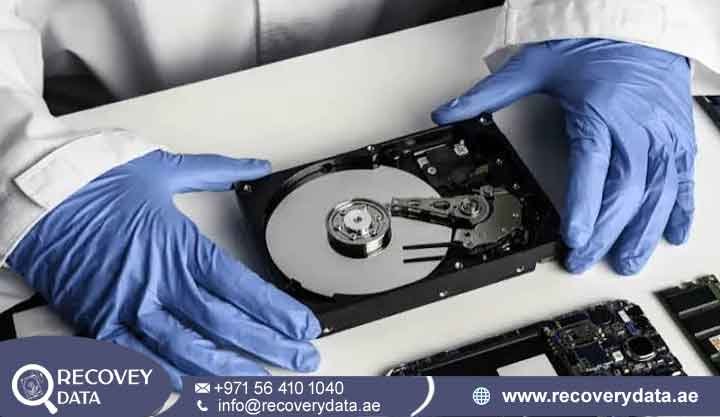
When a desktop hard drive, external storage device, or enterprise workstation suddenly goes quiet or starts making rhythmic clicking and ticking sounds, it can indicate a serious mechanical problem. For businesses, multimedia professionals, and individual users across Dubai and the UAE, losing access to databases, financial documents, or personal archives can cause major disruption.
Mechanical damage to the internal recording components requires specialized recovery methods. At Recovery Data, we provide advanced HDD head failure recovery Dubai services for drives with mechanical problems. Our technical lab in Al Barsha, Dubai, uses controlled cleanroom environments and specialized hardware recovery equipment. Our engineers assess the failure before taking any recovery action. They determine whether the heads, platters, spindle motor, PCB, or other components have suffered damage. This approach helps protect the remaining data and reduces unnecessary stress on the failing drive.
Identifying the Signs of HDD Head Damage and Mechanical Failure
Traditional hard disk drives contain several precision mechanical components. Inside the sealed enclosure, read/write heads move across magnetic platters while maintaining an extremely small clearance from the surface. The platters can rotate at thousands of revolutions per minute. A problem with the head assembly can prevent the drive from reading data. In some cases, damaged heads can also cause contact with the platter surface. Recognizing the warning signs early can help limit further damage.
Common Symptoms of a Failed Read/Write Head
Rhythmic clicking or ticking: Repetitive clicking or ticking is one of the most recognizable warning signs of a mechanical HDD problem. The sound can occur when the actuator repeatedly tries to initialize the read/write heads or locate the correct position on the platter. You may hear a regular clicking pattern, ticking noise, buzzing sound, or a combination of spinning and clicking.
Spin-up followed by sudden spin-down: When you connect an affected hard drive, you may feel a brief vibration as the spindle motor begins rotating the platters. The drive may appear to start normally for a few seconds before stopping unexpectedly. It may then become completely silent or produce several clicks before shutting down.
System non-detection or incorrect capacity: A damaged read/write head can prevent the hard drive from completing its normal initialization process. As a result, Windows, macOS, or Linux may fail to detect the storage device. The BIOS or UEFI may also fail to identify the drive during startup. In other cases, the computer may detect the device but display an incorrect capacity, such as 0 bytes, an incomplete model name, or other unusual drive information.
Severe freezing and I/O errors: A partially damaged or unstable head assembly may allow the hard drive to appear in the operating system for a short time. The drive may initially show folders or file names, but attempts to open or copy files can cause the computer to slow down dramatically. Applications may stop responding while waiting for the drive to complete a read operation.
Why You Should Stop Powering a Clicking HDD
If your hard drive starts clicking, ticking, grinding, or showing other signs of mechanical failure, turn it off immediately and disconnect it from the computer or power source. These sounds can indicate problems with the read/write heads, actuator assembly, spindle motor, or other internal components. Continuing to operate the drive without knowing the cause can place additional stress on already damaged parts. If the drive still contains important files, avoid repeated testing and seek professional assessment before attempting further recovery.
Repeatedly powering an unstable hard drive can increase mechanical wear and may worsen damage to the head assembly or platter surfaces. Every startup requires the drive to initialize its internal components and attempt to read information from the platters. If the heads are already unstable, repeated initialization attempts may produce additional read errors or mechanical problems. In some cases, a drive that initially had limited damage can become more difficult to image after continued operation.
Avoid running CHKDSK, disk repair utilities, partitioning tools, formatting commands, or consumer data recovery software on a mechanically failing HDD. These applications are designed to work with logical storage problems and cannot repair physically damaged read/write heads. Some tools may perform extensive read or write operations while attempting to scan, repair, or reconstruct the file system. This additional activity can place unnecessary stress on an unstable drive and may reduce the available recovery window.
Why HDD Head Failures Require Cleanroom Intervention
Hard drives contain extremely delicate mechanical components. Manufacturers assemble these devices in highly controlled environments to limit particulate contamination. When technicians need to access the internal components, they must control the working environment carefully. This helps protect the platter surfaces and head assembly during mechanical recovery.
Common Causes of HDD Mechanical Failure
Physical impact and drops: Portable hard drives can suffer damage after accidental drops or strong impacts. A drop can affect the actuator assembly, head suspension, spindle, or other internal components. Damage can occur while the drive is operating or, in some cases, while it is powered off.
Electrical surges and preamplifier failure: Power anomalies, lightning strikes, and faulty power supplies can damage HDD electronics. Electrical faults can affect the PCB and, in some cases, the preamplifier associated with the head assembly. Engineers must identify the affected component before selecting the appropriate recovery method.
Component wear and thermal stress: Mechanical components can wear over long periods of use. Bearings, spindle motors, actuator mechanisms, and head assemblies can gradually develop faults. Extended exposure to excessive heat can also contribute to component degradation.
The Role of a Class 100 Cleanroom
Opening a hard drive outside a controlled environment can expose its internal components to airborne particles, dust, moisture, and other contaminants. Modern hard drives operate with extremely small clearances between the read/write heads and magnetic platter surfaces. Even small particles can interfere with this delicate mechanical operation when the drive is open. For this reason, professional HDD head crash recovery Dubai procedures use a controlled Class 100 cleanroom environment or an equivalent contamination-controlled workspace. The controlled environment helps technicians reduce the risk of airborne contamination while they inspect or handle exposed internal components.
Our Professional HDD Head Replacement Process in Dubai
Mechanical head failure requires a hardware-level recovery approach. Software cannot repair a physically damaged read/write head assembly. Attempting to scan or repair an unstable drive can also place additional stress on the damaged components. At Recovery Data, our engineers follow a structured recovery process that begins with detailed diagnosis and continues through controlled mechanical intervention, sector-level imaging, file-system reconstruction, and secure data extraction. Each head failure case can behave differently. Some drives may still spin but produce repeated clicking, while others may stop during initialization or fail to communicate with the computer. Our engineers first identify the actual failure before deciding whether head replacement is appropriate. This controlled approach helps protect the original platters and reduces unnecessary activity on the damaged drive.
Step 1: Diagnostic Evaluation and Media Inspection
Every incoming drive undergoes a detailed diagnostic assessment at our Dubai laboratory. Engineers first examine the external condition of the device and check its electronic behavior. They inspect the PCB, connectors, power response, spindle activity, firmware behavior, and communication with specialized diagnostic equipment. If the symptoms indicate an internal mechanical problem, technicians may need to inspect the drive inside a controlled cleanroom environment. They carefully examine the head assembly, platter surfaces, actuator mechanism, and spindle components for signs of physical damage. The inspection can reveal head deformation, platter scoring, contamination, stiction, or other mechanical problems that may affect the recovery process.
Step 2: Sourcing a Compatible Donor Drive
A successful professional HDD head replacement service Dubai procedure requires careful donor selection. A standard replacement part may not work correctly with the affected drive. Hard drive manufacturers can use different head assemblies and preamplifier configurations across model families, production batches, and firmware revisions. Engineers compare several characteristics when selecting a donor. These can include the model family, firmware information, production details, platter configuration, head type, PCB information, and preamplifier characteristics. The exact matching requirements vary between manufacturers and individual drive families.
Step 3: Cleanroom Head Replacement
If diagnostics confirm head failure and replacement provides a viable recovery path, technicians perform the mechanical procedure inside a controlled cleanroom environment. This environment helps limit airborne contamination while engineers work with the exposed platter surfaces and internal mechanical components. Using specialized tools, fixtures, and microscopes, engineers carefully remove the damaged head assembly from the patient drive. They then install the compatible donor assembly while taking precautions to avoid touching or contaminating the magnetic platters.
Step 4: Controlled Drive Initialization and Testing
After the head replacement, engineers carefully test the drive before starting a full imaging process. They monitor how the drive initializes and communicates with specialized recovery equipment. The team checks whether the heads can read the available media and whether the drive remains stable during controlled access. Engineers also monitor unusual sounds, read errors, unstable sectors, and communication problems.
Frequently Asked Questions About HDD Head Failure Recovery
How much does data recovery cost in Dubai?
The cost depends on the type and severity of the failure. Logical problems require different methods from mechanical head failures. A head failure may require cleanroom work, compatible donor components, specialized imaging equipment, and additional engineering time. Recovery Data evaluates the device before providing the recovery scope and estimated cost.
Can data be recovered from an HDD with head failure?
Recovery may be possible when the platter surfaces remain sufficiently readable. If the heads fail without causing extensive media damage, engineers may replace the head assembly and create a sector-level image. Severe platter scoring can reduce recovery potential because affected magnetic areas may contain permanently unreadable sectors. The final outcome depends on the condition of the platters, heads, firmware, PCB, and other internal components.
Can a clicking HDD be recovered without losing data?
A clicking HDD can indicate a mechanical problem, although clicking alone does not identify the exact failure. Software utilities cannot repair a physically damaged head assembly. Professional recovery specialists can diagnose the device and determine whether mechanical intervention is necessary. If the platter surfaces remain readable, engineers may use a compatible head assembly to access and image the stored data.
How long does HDD head failure recovery take?
Initial evaluations typically take 24 to 48 hours, depending on the case and service requirements. The complete recovery timeline depends on the drive capacity, mechanical condition, donor availability, platter condition, and number of unstable sectors. Emergency recovery services may also be available for urgent business-critical cases.
Trusted Storage Recovery Across Dubai and the UAE
Our primary laboratory and secure intake facility are based in Dubai, but Recovery Data provides professional storage recovery support to customers throughout the UAE. We assist individuals, businesses, SMEs, multinational companies, and organizations that need help recovering important information from damaged or inaccessible storage devices. Our service coverage includes Abu Dhabi, Sharjah, Ajman, Umm Al Quwain, Ras Al Khaimah, and Fujairah, in addition to customers across different areas of Dubai. Whether the affected device comes from a home computer, office workstation, external storage enclosure, server, NAS system, or business environment, our engineers can assess the condition and identify the appropriate recovery approach.
Data Recovery for Businesses and Organizations
Businesses often depend on hard drives and storage systems for daily operations. A failed device may contain accounting records, customer databases, project files, employee documents, emails, media assets, or other important business information. A mechanical HDD failure can therefore interrupt normal operations and create additional pressure on the affected organization. Recovery Data supports businesses that require professional assistance with damaged storage media. Our engineers assess each device individually and select recovery methods based on the type of failure. Mechanical head damage, PCB faults, firmware problems, file-system corruption, and other failures can require different recovery procedures.
Contact Recovery Data
If your hard drive is clicking, ticking, failing to spin, showing an incorrect capacity, or becoming inaccessible, avoid repeated power cycles and further troubleshooting. Contact Recovery Data for a professional assessment. Our Dubai team can evaluate the condition of your HDD and determine whether mechanical head failure, PCB damage, spindle problems, or another hardware issue is affecting access to your data. Our recovery facility serves individuals, businesses, and organizations across Dubai and the wider UAE. Contact our team to discuss your storage problem and arrange a professional HDD head failure recovery assessment.
Website: recoverydata.ae
Email: info@recoverydata.ae
Phone: +971 56 410 1040
Location: Al Barsha, Dubai, UAE
Contact Recovery Data today for a professional HDD head failure recovery assessment.