
Data loss is a profoundly stressful experience, particularly when it strikes without warning. Imagine powering on your workstation or connecting an external storage volume in Dubai. Instead of your familiar directory structure, your operating system presents an unsettling error: “The drive must be formatted before you can use it,” or your volume displays as a raw file system with zero bytes available.
When a partition becomes corrupted, your operating system can no longer read the file allocation tables that index and organize your directories. However, in the vast majority of cases, hard drive corrupted partition recovery in Dubai is entirely possible. The underlying data files usually remain intact on the magnetic platters or flash memory cells. The structural map pointing to them has broken down. If you are facing an inaccessible volume, partition loss, or file system corruption, Recovery Data provides professional, secure evaluation and recovery solutions tailored to individuals, businesses, and enterprise clients across Dubai and the broader UAE.
Understanding Hard Drive Partition Corruption
To appreciate how professional recovery works, it helps to understand what happens beneath the surface when a partition becomes corrupted. Storage drives, whether mechanical hard disk drives (HDDs) or solid-state drives (SSDs), rely on partition tables (such as GUID Partition Table [GPT] or Master Boot Record [MBR]) and file systems (such as NTFS, FAT32, exFAT, APFS, or EXT4) to index and locate data.
When this structural metadata suffers damage, the operating system loses its roadmap. The physical sectors containing your personal documents, family photographs, financial databases, or corporate archives may still hold your information intact. However, the system can no longer map them correctly.
What Causes a Hard Drive Partition to Become Corrupted?
Hard drive partition corruption can happen due to several software, hardware, and user-related issues. A sudden power outage or electrical surge can interrupt active write operations and leave partition information incomplete or damaged. Improperly disconnecting an external hard drive while files are being accessed can also corrupt the file system or partition structure. Bad sectors and physical wear are another common cause, especially on older hard drives. If critical partition information or the Master File Table (MFT) is stored in damaged sectors, Windows may no longer recognize the partition correctly.
Malware and ransomware can also damage file system structures or make stored data inaccessible. Interrupted partition resizing, merging, or formatting operations can cause serious corruption if the computer crashes or loses power during the process. Other causes include operating system failures, damaged partition tables, faulty cables or enclosures, accidental formatting, and physical damage to the hard drive. When a partition suddenly becomes RAW, unallocated, or inaccessible, avoid formatting or repeatedly running repair tools until you determine the cause. These actions may make data recovery more difficult.
Signs Your Hard Drive Partition Is Damaged
Recognizing the early signs of a damaged hard drive partition can help prevent further data loss. One of the most common warning signs is when the drive letter remains visible in File Explorer, but Windows immediately asks you to format the drive when you try to open it. This usually indicates that the operating system cannot properly read the existing file system. Another clear sign is when the drive suddenly appears as RAW instead of NTFS or FAT32. Windows may also show the partition with 0 bytes used and 0 bytes free, even though the drive previously contained a large amount of data. This does not necessarily mean that your files have been erased. It can indicate that important file system or partition information has become corrupted.
You may also notice CRC errors, extremely slow folder loading, or system freezes when trying to access certain files or directories. These symptoms can point to damaged sectors or corrupted file system structures. If the hard drive repeatedly freezes the computer whenever you try to access it, avoid forcing repeated scans or repairs. The underlying issue could involve physical drive damage.
Professional Partition Recovery Solutions in Dubai
When dealing with a corrupted or inaccessible partition, understanding the critical distinction between logical corruption and physical hardware failure is vital for preserving your data.
Logical vs. Physical Partition Damage
Understanding whether a corrupted partition has a logical problem or a physical hardware failure is one of the most important parts of the data recovery process. Both situations can produce similar symptoms, such as an inaccessible partition, missing files, RAW file system errors, unallocated space, or a drive that refuses to open in File Explorer.
Logical Partition Corruption: Logical partition corruption occurs when the physical storage media is still functioning, but important information used to organize and access the data has become damaged. The hard drive may spin normally, remain consistently detected by the computer, and communicate correctly with the operating system, yet the partition itself may appear inaccessible or corrupted. Common causes include sudden power failures, improper disconnection, accidental formatting, malware, operating system crashes, damaged file system metadata, and interrupted partition resizing or modification operations.
Physical Hard Drive Failure: Physical failure is more serious because the partition corruption is often only a symptom of an underlying hardware problem. A hard drive may develop degraded read/write heads, spindle motor problems, damaged magnetic surfaces, electronic component failure, or a rapidly increasing number of bad sectors. When this happens, the operating system may report partition corruption because it cannot reliably read the sectors containing important file system or partition information.
Our Diagnostic and Recovery Workflow
At our data recovery facility, we follow a careful and methodical recovery process to protect your storage device and maximize the chances of retrieving important files. We first perform a comprehensive evaluation to identify whether the problem comes from logical partition corruption, file system damage, bad sectors, or mechanical and electronic failure. For drives showing signs of physical failure, our engineers can create a sector-level image or clone before performing recovery work.
This process copies readable data from the original drive to a secure working copy. It reduces the need to repeatedly access a fragile storage device. Our specialists then work from the appropriate recovery image to analyze and reconstruct damaged MBR or GPT partition structures, volume boot records, and file system information where possible.
Once the partition structure has been restored or the files have been located through advanced recovery techniques, the recovered data is carefully checked for integrity. Files are then extracted and transferred to a healthy storage device supplied for the recovery process. This structured approach helps protect the original media while providing the safest possible path toward recovering your important data.
Deep Dive into Storage Technologies and File Systems
Different storage media present unique challenges during a partition recovery procedure. Our technical team handles a vast array of devices and file architectures.
Hard Disk Drives (HDDs) and Mechanical Failures
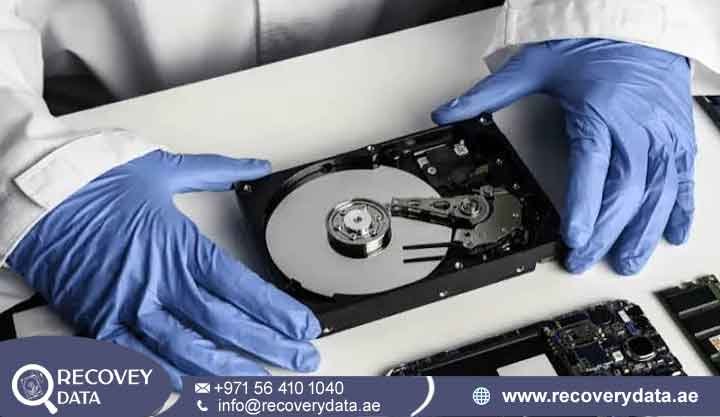
Traditional HDDs rely on rotating magnetic platters and precision actuator arms. When partition corruption is accompanied by mechanical wear, physical interventions in a cleanroom environment are often necessary prior to logical partition repair. For more details on our mechanical capabilities, visit our Hard Drive Data Recovery Dubai hub page.
Solid-State Drives (SSDs) and Flash Architecture
SSDs utilize NAND flash memory and advanced flash controllers governed by the Flash Translation Layer (FTL). When an SSD suffers partition corruption or controller lockup, standard data recovery software is entirely ineffective. Recovering data from corrupted SSD partitions requires specialized hardware-software tools to communicate directly with the controller and bypass firmware corruption.
Multi-Platform File System Expertise
Partition corruption can affect storage devices regardless of the operating system or file system they use. Our engineers have experience working with a wide range of file systems used across personal computers, workstations, servers, and external storage devices. This allows us to assess damaged partitions and determine the most appropriate recovery approach based on the device and file system involved.
For Windows systems, our recovery expertise includes NTFS, FAT32, exFAT, and ReFS.
These file systems are commonly found on internal hard drives, SSDs, USB drives, external storage, and enterprise systems. We can investigate issues such as inaccessible partitions, corrupted directory structures, missing volumes, and damaged file system metadata.
For macOS devices, we work with modern APFS volumes as well as older HFS+ file systems. Partition problems on Mac computers can occur after drive failures, operating system issues, accidental formatting, or partition structure changes. Our specialists can analyze the available file system information and work toward recovering accessible files whenever technically possible.
Why Choose Our Data Recovery Services?
Entrusting important personal files, business documents, or sensitive corporate archives to a data recovery provider requires trust, technical expertise, and strong confidentiality practices. Our recovery process is designed to handle complex storage problems carefully while keeping the safety of your data a priority.
Our advanced technical expertise allows us to work with complex file systems, damaged partitions, proprietary storage formats, and different operating system environments. Whether the issue involves a corrupted partition, inaccessible volume, damaged file system, or failing storage device, our engineers assess the underlying problem before selecting a recovery approach.
For hard drives experiencing physical problems alongside partition corruption, our specialized cleanroom facilities provide a controlled environment for delicate internal drive procedures.
Mechanical hard drives contain sensitive components that can be affected by dust and contamination. Controlled conditions help create a safer workspace when internal examination or component-level recovery is required.
Data confidentiality is also an important part of the recovery process. Personal photographs, business records, financial documents, databases, and other private files are handled with strict care throughout evaluation and recovery. We follow secure procedures to help protect client information from unauthorized access during the recovery process.
We also believe in transparent communication. Before recovery work begins, we explain the condition of the storage device, the likely recovery options, and the applicable costs.
This gives you a clear understanding of the situation before making a decision. Our goal is to provide a professional and straightforward recovery experience from initial diagnosis through final data extraction.
If your external storage device is also showing physical or logical problems, you can explore our External Hard Drive Repair and Data Recovery services for additional assistance.
Frequently Asked Questions
Can data be recovered from a hard drive partition that shows as RAW?
Yes. A RAW file system designation simply means Windows can no longer recognize the file allocation table format. The underlying data is usually intact. Avoid formatting the drive when prompted, and seek professional assistance to rebuild the file system structure.
Should I run chkdsk or automated repair tools on a corrupted partition?
Running utilities like chkdsk on a failing drive or severely corrupted partition can be hazardous. If the drive has physical bad sectors or deeply scrambled metadata, automated repair commands can aggressively truncate or overwrite valid file fragments. This can turn a recoverable situation into permanent data loss.
How much does data recovery cost in Dubai?
The cost depends entirely on the complexity of the failure. This includes whether the corruption is purely logical or compounded by physical hardware damage requiring cleanroom intervention. We provide a thorough evaluation and transparent quotation before initiating any recovery procedures.
How long does the recovery process take?
Standard evaluations are typically completed swiftly. Depending on the capacity of the drive, the extent of data fragmentation, and whether hardware repairs are required, full recovery timelines generally range from a few days to a week. Expedited emergency services are available for critical business situations.
Contact Recovery Data
If you are experiencing data loss due to a corrupted partition, damaged file system, or inaccessible drive, do not risk permanent loss by attempting unverified software fixes.
Contact Recovery Data for a professional data recovery assessment.
Email: info@recoverydata.ae
Phone: +971 56 410 1040
Location: Dubai, UAE