
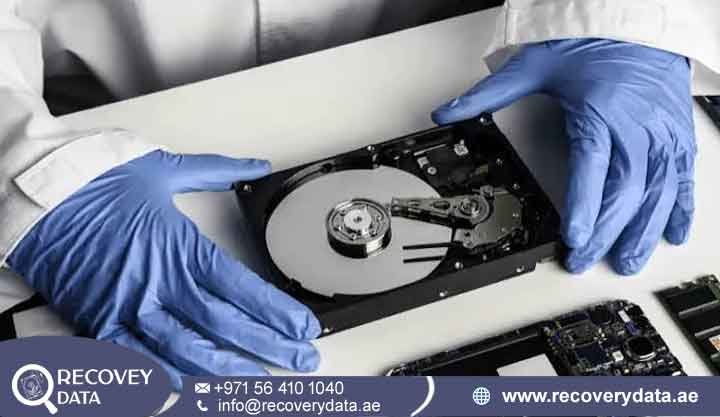
Is your hard drive spinning normally but failing to mount, showing a 0-byte capacity, or disappearing from BIOS and the operating system? These symptoms can indicate a serious firmware or Service Area problem. A drive may still spin and produce normal mechanical sounds while its internal firmware prevents proper initialization. In such cases, standard file-recovery software and partition utilities may not be able to communicate with the drive at the level required for recovery.
At Recovery Data, we provide specialized hard drive firmware failure recovery Dubai services for businesses and individuals across the UAE. Our engineers use advanced diagnostic equipment and controlled recovery procedures to investigate firmware modules, Service Area problems, translator issues, and related hardware faults. Where possible, we restore temporary drive access and create a controlled image of the available data. If your hard disk has suffered firmware corruption, incorrect capacity reporting, BSY problems, or initialization failure, contact Recovery Data for a professional data recovery assessment.
Understanding Hard Drive Firmware Corruption & Failure
A modern hard disk is more than a simple mechanical storage device. It combines precision mechanics, electronics, firmware, and a structured system of internal modules. The drive needs these components to work together before a computer can access the stored files. The PCB manages the drive’s electronics and communication. The magnetic platters store the actual user data. The read/write heads access the magnetic recording surface. Firmware coordinates many of these functions and helps the drive locate and manage its recorded information. This is why a hard drive can appear mechanically healthy but still fail to initialize. The motor may spin normally, yet the computer may report the drive as unavailable, show an incorrect capacity, or become unresponsive while detecting the device.
What Is HDD Firmware and Why Does It Fail?
Hard drive firmware consists of low-level code and data that control important drive operations. Depending on the manufacturer and model, some firmware-related information resides on the PCB while other modules are stored in reserved areas of the magnetic media. A major portion of this information can reside in the Service Area (SA), also called the system area. The drive uses this reserved area during startup and normal operation. If important modules become unreadable or corrupted, the HDD may struggle to complete its initialization process.
The Service Area can contain information such as:
Translator Information: The translator helps the drive map logical block addresses to locations on the physical recording surface. If the translator becomes damaged or inaccessible, the drive may have difficulty locating user data correctly.
Adaptive Data: Hard drives use drive-specific calibration information to manage their individual heads and media characteristics. This information can vary between drives, even within the same product family.
Defect Lists and System Logs: Factory and operational defect information helps the drive manage problematic areas of the media. Manufacturers use different structures and module systems for this information.
Firmware Modules: Other internal modules support functions such as initialization, diagnostics, error management, and communication with the host system.
How Firmware Failure Can Occur
Firmware problems can develop for several reasons. A failing head may repeatedly struggle to read important Service Area modules. Bad sectors can also affect firmware-related regions. Electrical problems may corrupt or damage drive electronics, while aging media can make previously readable system information difficult to access. A power interruption during a critical operation can also contribute to corruption in some circumstances. However, firmware failure does not always have a single cause. Engineers must examine the drive’s symptoms and diagnostic behavior before identifying the actual failure. When the drive cannot load the required modules during startup, it may remain in a BSY (Busy) state, repeatedly restart, stop responding, or report incorrect identification information.
Symptoms of Hard Drive Firmware Failure
Recognizing firmware-related symptoms can help you avoid actions that may complicate the recovery process. A drive that shows one of these symptoms does not necessarily have firmware damage, but the behavior can justify professional diagnosis.
The Drive Spins Up, Then Spins Down or Stops: The motor may start normally, but the drive can stop responding during initialization. In some cases, the drive may make a few clicks or restart repeatedly. A firmware problem can cause this behavior, although mechanical and head-related faults can produce similar symptoms.
Not Recognized by BIOS/UEFI: A hard disk with an initialization problem may fail to appear in BIOS or UEFI. Some drives cause the system to pause while the computer attempts to identify them. Other drives may appear briefly and then disappear.
Incorrect Capacity Reporting: Firmware-related problems can cause the drive to report an incorrect capacity. A drive may display 0 GB, a significantly reduced capacity, or an unexpected model or identification string. Incorrect capacity can also result from other hardware or firmware conditions, so engineers must perform further diagnostics.
Continuous Clicking or Ticking: Clicking does not automatically prove that the firmware has failed. Head problems, servo issues, and other mechanical faults can also cause clicking. Some drives may produce repetitive sounds when they cannot complete an internal initialization or module-reading process.
External Hard Drive Lockups: An external HDD may power on but fail to mount in Windows or macOS. The enclosure may show a connection notification while the actual storage volume remains inaccessible. The problem can involve the HDD firmware, PCB, USB bridge, power supply, or file system.
Our Specialized Hard Drive Firmware Repair & Recovery Process
Firmware recovery requires a different approach from ordinary file restoration. Standard recovery programs work through the operating system and depend on the drive communicating correctly. When low-level firmware prevents normal initialization, engineers need specialized diagnostic access. At Recovery Data, our process begins with diagnosis rather than immediate firmware modification. This helps identify the failure and reduces unnecessary changes to the original device.
Phase 1: Diagnostic Assessment & Controlled Evaluation
Every drive submitted to our Dubai laboratory undergoes a structured technical assessment.
Physical and Electronic Testing: Engineers inspect the PCB and evaluate the drive’s power behavior. They check whether the motor starts and assess the available communication with the device. Where appropriate, they also investigate possible head, preamplifier, or media-related problems.
Firmware and ROM Assessment: The team determines whether the PCB can communicate with the drive and whether relevant firmware information remains accessible. This assessment helps separate PCB problems from Service Area or internal media issues.
Controlled Handling: If diagnostics indicate possible internal mechanical damage, the drive requires additional care. Engineers can move the device into a Class 100 Cleanroom environment when internal access becomes necessary. The controlled environment helps reduce airborne contamination during internal HDD work.
Phase 2: Advanced Hardware-Software Tooling & Diagnostic Access
A firmware-related failure often requires specialized recovery equipment. Professional systems such as the PC-3000 Data Recovery System can provide engineers with diagnostic functions that standard operating-system utilities do not offer.
Safe Diagnostic Access: Depending on the drive model, engineers may establish low-level communication through supported diagnostic interfaces. This can provide information about the drive’s firmware state, system modules, error conditions, and initialization behavior.
Temporary Loader Techniques: Certain recovery procedures may use specialized loaders to provide temporary access to a drive when its normal firmware cannot complete initialization. The exact method depends on the manufacturer, model, firmware architecture, and failure condition. This process does not mean that engineers simply bypass the entire firmware system. They must understand which modules are affected and which operations can safely provide access without unnecessarily altering the original media.
Firmware Module Analysis: Engineers can inspect relevant modules and determine whether corruption, unreadable sectors, translator problems, or other conditions are preventing normal operation. Where technically appropriate, they can work with copies or controlled modifications rather than making unnecessary changes to user-data areas.
Phase 3: Service Area Recovery & Sector Imaging
Once engineers establish stable diagnostic access, the main objective becomes data preservation.
Service Area Management: If required modules remain accessible, engineers can work to restore sufficient drive functionality for controlled imaging. In some cases, damaged modules may require repair or reconstruction. The exact procedure varies considerably between manufacturers and drive families.
Sector-by-Sector Imaging: The team then attempts to create a physical image of the available sectors onto healthy destination storage. Specialized imaging systems can manage read errors, timeouts, unstable sectors, and controlled resets more effectively than ordinary file-copy methods.
Imaging the original drive is important because repeated file-level access can place additional demands on an unstable device. A working copy gives engineers a safer environment for later file-system analysis.
File-System Reconstruction: After imaging, engineers can analyze the resulting data using appropriate file-system recovery methods. Depending on the original system, this may involve NTFS, exFAT, HFS+, APFS, EXT, or another file system. The recovery team can then reconstruct directories and identify accessible documents, photographs, databases, videos, archives, and other files.
When Firmware Failure Is Linked to Physical Damage
Firmware symptoms do not always mean that the problem exists only in software or system modules. A hard drive may develop firmware-related errors because another component has begun to fail. For example, a weak read/write head may struggle to read important Service Area modules. The resulting read errors can make the drive appear to have a firmware problem. Similarly, degraded magnetic media can cause repeated read failures in critical system areas. This distinction matters because repairing or modifying firmware alone may not solve the underlying problem. If engineers identify evidence of internal head or media damage, they must adjust the recovery strategy. In suitable cases, controlled internal work may include head replacement or other specialized mechanical procedures. Such work requires a controlled environment and should only take place after appropriate diagnosis.
Supported Hard Drive Brands & Storage Technologies
Different HDD manufacturers use different firmware structures, module systems, diagnostic commands, and recovery procedures. Engineers must therefore identify the exact drive family before selecting a recovery method.
Western Digital (WD) Hard Drive Firmware Recovery
Western Digital drives use manufacturer-specific firmware structures and system modules. Certain failures can involve slow responses, module access problems, translator issues, or incorrect drive identification.
Recovery work may involve specialized diagnostics to determine which firmware modules remain accessible and whether the drive can be stabilized for imaging.
Seagate Hard Drive Firmware Recovery
Seagate HDDs can experience different firmware and initialization problems depending on their model and firmware family. Some cases involve persistent BSY behavior, communication problems, system-area errors, or translator-related issues. Professional recovery equipment can help engineers identify the specific condition rather than relying on generic software repair tools.
Toshiba & HGST Firmware Recovery
Toshiba and HGST drives also use proprietary firmware architectures. Desktop and enterprise models can exhibit different initialization and system-area behaviors. Engineers must match the diagnostic procedure to the exact model, firmware family, and hardware configuration. This helps prevent unsuitable firmware operations from complicating the recovery case.
External Hard Drive Firmware Failure Recovery
External hard drives face additional failure points because they combine an internal HDD with an enclosure, USB interface, bridge electronics, and external power components. A portable drive may appear to have firmware failure when the actual problem exists in its USB bridge or power circuit. In other cases, the external electronics may work correctly while the internal HDD has developed a firmware or mechanical fault. Recovery specialists therefore test the complete device before selecting a recovery route. For clients in Dubai and across the UAE, Recovery Data can assess external hard drives that fail to mount, report incorrect capacity, disconnect repeatedly, or become inaccessible after a sudden power interruption.
Why Choose Recovery Data for HDD Firmware Recovery in Dubai?
Firmware recovery requires specialized knowledge and careful handling. A technician must understand the relationship between the PCB, firmware modules, Service Area, heads, media, and file system before making changes to an unstable drive.
Deep Technical Expertise: Our recovery team works with low-level HDD diagnostics, firmware structures, Service Area modules, and manufacturer-specific recovery procedures. We use the diagnostic information to determine an appropriate recovery strategy for each device.
Controlled, Data-Focused Procedures: We focus on preserving the original data throughout the recovery process. Engineers avoid unnecessary formatting, initialization, and file-system repair attempts on the original device.
Advanced Recovery Equipment: Specialized hardware and software tools support low-level diagnostics, firmware analysis, and controlled sector imaging. These tools provide capabilities that ordinary Windows and macOS utilities do not provide.
Professional Laboratory Support: When a case requires internal HDD intervention, engineers can use a controlled Class 100 Cleanroom environment. This helps protect the internal drive assembly from airborne contamination during approved procedures.
Comprehensive UAE Coverage: Recovery Data serves customers across Dubai and the wider UAE, including Abu Dhabi, Sharjah, Ajman, Umm Al Quwain, Ras Al Khaimah, and Fujairah.
Frequently Asked Questions
Can data be recovered from an HDD with corrupted firmware?
Data recovery can be possible when an HDD has corrupted firmware. The actual recovery prospects depend on the condition of the Service Area, magnetic media, read/write heads, PCB, and other internal components. If the user-data area remains readable, specialized recovery equipment may allow engineers to stabilize the drive and create a sector-level image. Firmware failure alone does not automatically mean that the stored files are lost.
How can I recover data from a hard drive with firmware failure at home?
Home users should avoid attempting low-level firmware repairs without the appropriate equipment and technical knowledge. Standard partition software cannot normally repair a drive that fails before it completes its internal initialization process. Commands such as formatting, initialization, partition repair, or repeated scanning can also complicate a recovery case. A safer approach is to stop unnecessary testing and have the drive assessed by a professional recovery laboratory. Engineers can first determine whether the problem involves firmware, PCB electronics, mechanical components, or the file system.
What is the hard drive firmware failure data recovery cost in Dubai?
The hard drive firmware failure data recovery cost in Dubai varies according to the drive model, capacity, failure type, firmware condition, and presence of physical damage. A straightforward firmware-related case may require a different procedure from a drive that also has weak heads or damaged media. Recovery Data performs a technical assessment before providing a recovery quotation.
Can corrupted hard drive firmware be repaired permanently for continued use?
A firmware-related problem may sometimes be repaired sufficiently to restore drive access. However, the underlying cause must also be investigated. If firmware problems result from aging media, unstable heads, or developing bad sectors, the drive may not be suitable for continued use as a primary storage device. After successful data extraction, replacing the affected drive is generally the safer approach.
Can a hard drive with 0-byte capacity be recovered?
A 0-byte or incorrect-capacity reading can result from several conditions, including firmware problems, translator issues, PCB faults, or other internal failures. Recovery may still be possible if the underlying user data remains readable. Engineers need to diagnose the drive at a low level before determining the correct recovery method.
Does clicking always mean that the hard drive has firmware failure?
No. Clicking can result from several different HDD problems. Head failure, servo problems, mechanical faults, and certain initialization issues can all produce repetitive sounds. If a drive clicks and contains important data, avoid repeatedly powering it on. A professional diagnosis can help determine the actual cause before further damage occurs.
Secure Your Data Today
If your hard drive spins but fails to mount, reports the wrong capacity, disappears from BIOS, or remains stuck in a firmware-related state, avoid experimenting with unknown repair utilities. A firmware failure can involve the Service Area, translator, PCB, read/write heads, or magnetic media. The correct recovery method depends on the underlying fault. Professional diagnosis helps engineers identify that fault before they begin data extraction. Recovery Data provides professional hard drive firmware failure recovery Dubai services for HDDs, external drives, business storage, and other affected media.
Contact Recovery Data for a professional data recovery assessment.
Email: info@recoverydata.ae
Phone: +971 56 410 1040
Location: Dubai, UAE