
Experiencing sudden data loss can be a stressful event, whether it involves losing treasured personal photographs or critical business databases. When a storage device stops working or files vanish without warning, understanding what causes hard drive failure and data loss is the first step toward figuring out what went wrong and how to fix it safely.Storage media ranging from traditional mechanical hard drives to advanced solid-state drives and enterprise servers are complex engineering marvels operating under tight physical and electronic tolerances. Over time, physical wear, environmental stressors, electrical anomalies, or human error can push these devices beyond their limits. At Recovery Data, we evaluate and recover damaged storage media for individuals and enterprises across Dubai and the UAE. To help you navigate these issues, this comprehensive guide explores the root causes of hard drive failure, the distinction between mechanical and logical breakdowns, and how to protect your valuable information.
The Anatomy of Data Loss: Mechanical vs. Logical Failures
Before diagnosing why a device failed, it is essential to categorize the nature of the damage. Data loss generally falls into two distinct categories: logical failures and physical failures. Although both problems can make files inaccessible, they require very different recovery approaches.
Logical Failures: The underlying storage hardware is completely functional, but the data becomes inaccessible due to corrupted file systems, damaged partition tables, accidental formatting, malware attacks, deleted files, operating system errors, or interrupted data transfers. The physical media can still read and write sectors, but the software structures that organize the information have become damaged or unavailable. F
Physical Failures: The hardware itself has suffered structural, mechanical, electrical, or electronic damage. This can include oards, firmware problems, broken connectors, electrical surges, overheating, or worn-out NAND flash.
Understanding this difference is vital because the wrong recovery procedure can make an existing problem significantly worse. A logical issue may sometimes be resolved through carefully controlled data reconstruction, while a physically damaged drive can deteriorate further when subjected to repeated scans, file-system repairs, or unnecessary read operations. For example, running aggressive recovery software on a hard drive with failing read/write heads may place additional stress on the mechanism and cause the drive to stop responding completely.
Top Causes of Mechanical and Physical Hard Drive Failure

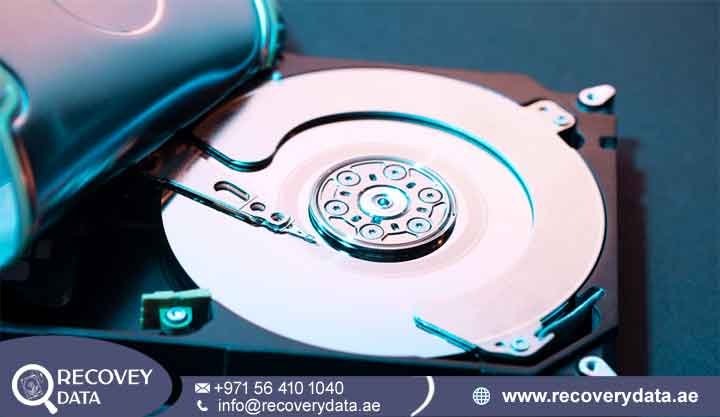
Traditional Hard Disk Drives (HDDs) rely on precision mechanical components operating at high speeds to read and write data accurately. Over time, these components can wear out because of age, heat, vibration, power problems, or continuous usage. Common failures include damaged read/write heads, spindle motor problems, platter damage, faulty circuit boards, and firmware issues. Physical impacts, accidental drops, electrical surges, and overheating can also cause serious mechanical damage and make stored files inaccessible. When these failures occur, professional data recovery may be required to safely extract information without causing further damage.
Head Crashes and Spindle Motor Seizure
Inside an HDD, microscopic read/write heads float on a microscopic cushion of air just nanometers above spinning magnetic platters. If the computer is dropped, jolted, or subjected to a sharp physical impact while running, the read/write heads can make direct contact with the spinning platter surface. This phenomenon, known as a head crash, gouges the magnetic coating, instantly destroying data tracks and generating microscopic debris. Similarly, the spindle motor responsible for rotating the platters at 5,400 to 10,000 RPM can seize up due to bearing wear or lubrication failure, preventing the drive from spinning altogether.
Electrical Damage, Power Surges, and Lightning
Electrical anomalies are a frequent culprit behind sudden drive failures. Unstable power grids, faulty Power Supply Units (PSUs), or unexpected voltage spikes can send a destructive surge through the device’s Printed Circuit Board (PCB). This often fries integrated circuits, surge protection diodes, or read-channel chips, rendering the drive completely unresponsive.
Environmental Factors: Heat, Dust, and Humidity in the UAE
Operating storage hardware in harsh environments accelerates hardware degradation. Excessive heat causes internal mechanical components to expand unevenly, warping platters and stressing bearings. Furthermore, microscopic dust particles or humidity can infiltrate unsealed or compromised enclosures, leading to surface corrosion and immediate read failures. Proper climate control and ventilation are crucial for safeguarding data servers and local workstations across the UAE.
Logical Corruption and Software-Driven Data Loss
Not all data loss involves broken hardware. Many system failures stem from software corruption, file system errors, accidental deletion, or human mistakes. These problems can make files inaccessible even when the storage device itself remains physically healthy and operational. Common causes include accidental formatting, damaged partitions, malware attacks, interrupted transfers, and improper drive removal. In many cases, advanced recovery methods can reconstruct damaged file systems and restore inaccessible or deleted data.
Bad Sectors and File System Degradation
As a hard drive ages, microscopic areas of the magnetic media can lose their magnetic charge, creating “bad sectors.” If bad sectors proliferate across critical regions of the disk such as the Master File Table (MFT) in NTFS or the volume allocation blocks The operating system loses its ability to read directory structures. This frequently leads to inaccessible partitions, RAW drive errors, or sudden file system corruption. For more details on addressing logical volume structures, explore our guide on Hard Drive Corrupted Partition Recovery in Dubai.
Malware, Ransomware, and Cyber Attacks
Malicious software has evolved to target storage integrity directly. Ransomware encrypts user files and deletes shadow copies, while wiper malware corrupts boot sectors and partition maps. When cyber threats compromise system integrity, specialized decryption or raw carving techniques are often required to salvage surviving fragments.
Human Error: Accidental Deletion and Formatting
Despite advanced automation, human error remains one of the leading causes of data loss worldwide. Accidental file deletions, emptying the recycle bin, formatting the wrong drive partition, or interrupting a disk repartitioning process can instantly disconnect users from critical files. Fortunately, because the underlying hardware is usually healthy, professional data recovery procedures have a high success rate in these scenarios.
Solid-State Drive (SSD) Failure Mechanisms
While solid-state drives lack the moving parts of traditional HDDs, they are far from immune to failure. SSDs rely on NAND flash memory cells and complex flash controllers governed by the Flash Translation Layer (FTL).
Controller Lockups and NAND Wear
When an SSD fails, it is usually because the controller chip has crashed, the firmware has become corrupted, or the flash memory cells have exceeded their program/erase (P/E) cycle limits. Unlike mechanical drives that often exhibit warning clicks before failing, SSDs tend to fail suddenly without prior notice. Recovering data from a failed SSD requires specialized hardware-software suites that can bypass the controller and communicate directly with the memory chips.
Early Warning Signs of an Impending Hard Drive Failure
Hard drives rarely fail without showing some form of warning, although electrical surges, severe mechanical damage, or sudden component breakdown can cause immediate failure. In many cases, however, the drive gradually develops symptoms that become more noticeable over time. Recognizing these signs can provide an important opportunity to back up your files before the drive becomes completely inaccessible.
Unusual Noises: Clicking, ticking, buzzing, grinding, or repeated beeping sounds can indicate mechanical problems, particularly in traditional HDDs. Sudden clicking may point to failing read/write heads or actuator problems. Extreme Sluggishness: A significant decline in performance can indicate that the drive is struggling to read stored information. Files may take unusually long to open, folders may freeze, and the computer may become unresponsive during disk access. Disappearing Files or Folders: Missing documents, photographs, folders, or other files may indicate file-system corruption, damaged directory structures, failing sectors, or problems accessing specific areas of the drive.
Continued use can overwrite recoverable information.Frequent Blue Screens (BSOD) or Reboots: Repeated blue-screen errors, unexpected restarts, freezing, or boot failures can sometimes indicate storage problems. Windows may become unstable when it cannot reliably read essential system files from a failing drive. SMART Error Warnings: Self-Monitoring, Analysis, and Reporting Technology, known as SMART, monitors various aspects of storage health. Warnings about reallocated sectors, pending sectors, read errors, temperature, or other attributes can indicate declining hardware reliability.
Professional Recovery vs. DIY Risks
When a hard drive fails or suddenly becomes inaccessible, the temptation to download free recovery software or run automated repair commands such as chkdsk can be very strong. These tools may appear convenient because they are readily available and often promise to repair corrupted files, restore partitions, or make an inaccessible drive usable again. However, attempting DIY recovery without first identifying the actual cause of the failure can create additional problems and may reduce the chances of recovering important data. A drive that appears to have a simple software issue may actually be suffering from failing read/write heads, bad sectors, firmware problems, unstable NAND memory, damaged partition structures, or another underlying hardware fault.
If important files are stored on a failed or unstable drive, avoid formatting the device, avoid initializing an unknown partition, do not repeatedly run chkdsk, and do not save new files to the affected media. Disconnecting the device and seeking an appropriate professional assessment can help preserve the remaining recovery possibilities. The earlier a failing storage device is handled correctly, the better the opportunity to prevent additional damage and recover the maximum amount of available data.
Frequently Asked Questions
Can a power surge permanently destroy a hard drive?
Yes. A sudden power surge, electrical spike, unstable power supply, or lightning strike can permanently damage a hard drive’s electronic components. The Printed Circuit Board (PCB) controls communication between the drive and computer, so damage to the PCB can prevent the system from detecting or accessing the drive. In some cases, the surge may also damage sensitive components connected to the PCB. However, electrical failure does not always mean that the data stored on the platters is permanently lost.
What are the most common signs that my hard drive is about to fail?
Several warning signs can indicate that a hard drive is becoming unreliable. Common symptoms include clicking, ticking, grinding, unusual buzzing, disappearing files, frequent system freezing, extremely slow performance, repeated crashes, unexpected disconnections, and SMART error warnings. A drive may also take much longer than usual to open folders or transfer files, particularly when it encounters damaged or difficult-to-read sectors. In some cases, Windows may report that the drive needs to be formatted or may display the partition as RAW or inaccessible.
Can overheating cause a hard drive to stop working?
Yes. Excessive heat can negatively affect both the mechanical and electronic components of a hard drive. Traditional HDDs contain precision components that operate within specific tolerances, and prolonged exposure to high temperatures can accelerate component wear and contribute to unstable operation. Heat can also affect the drive’s electronic circuitry and increase the likelihood of read or write errors.
What should I do immediately if my hard drive fails?
If a hard drive suddenly fails, the first step is to stop using it and power down the computer or external enclosure if doing so can be done safely. Avoid repeatedly restarting the system to check whether the drive has recovered. Do not format the drive, initialize an unknown partition, delete partitions, or run multiple third-party repair utilities. You should also avoid running intensive disk scans when the drive is producing clicking noises, repeatedly disconnecting, or showing other signs of physical failure.
How much does data recovery cost in Dubai?
The cost of data recovery in Dubai depends on the type of storage device, severity of the failure, amount of damage, and complexity of the recovery process. A simple logical problem, such as accidental deletion or certain types of partition corruption, may require a very different recovery procedure from a hard drive with damaged read/write heads or a failed spindle motor.
Do you provide device collection and drop-off across the UAE?
Yes. We offer secure device collection and delivery coordination across Dubai, Abu Dhabi, Sharjah, Ajman, and other UAE emirates to make the recovery process more convenient for individuals and businesses. Customers do not always need to arrange complicated transportation for a failed hard drive, SSD, USB device, memory card, or other storage media. Collection and delivery can be coordinated according to the location and circumstances of the customer.
Contact Recovery Data
If your storage device is showing signs of failure or has suffered unexpected data loss, do not risk permanent file destruction by using unverified software fixes or repeated repair attempts. Contact Recovery Data for a professional data recovery assessment so the condition of your hard drive, SSD, USB drive, memory card, or other storage media can be carefully evaluated. Early professional assistance can help identify whether the problem is caused by logical corruption, mechanical failure, electronic damage, or another storage issue. A proper assessment also helps determine the safest recovery approach while reducing the risk of further damage to your valuable files.
Email: info@recoverydata.ae
Phone: +971 56 410 1040
Location: Dubai, UAE